
Designmodo Postcards Review: Features and Pricing
Looking for a Designmodo Postcards review? Read on to learn more about the email builder, integrations, templates, and pricing plans.
Designmodo Postcards: Overall Features Review
Postcards is an HTML email builder by Designmodo. It’s a drag-n-drop editor where you can work with modules to craft a template. When the structure of an email is ready, edit the text, add the necessary images and send the newsletter!
Some of the features of Designmodo Postcards include:
- collaborative tools for teamwork: shared workspaces, real-time editing, comments, and roles;
- one-click export to 18 email platforms on every plan, plus HTML or ZIP download for any other platform;
- image hosting on paid plans;
- AI Suite: an email template from a plain-language prompt and HTML Email Import that converts an existing HTML email into an editable Postcards template (paid plans, uses AI credits);
- AMP carousels and accordions with an HTML fallback on paid plans;
- a plugin for Figma and add-ons for Gmail and Outlook.
Postcards Email Templates Review
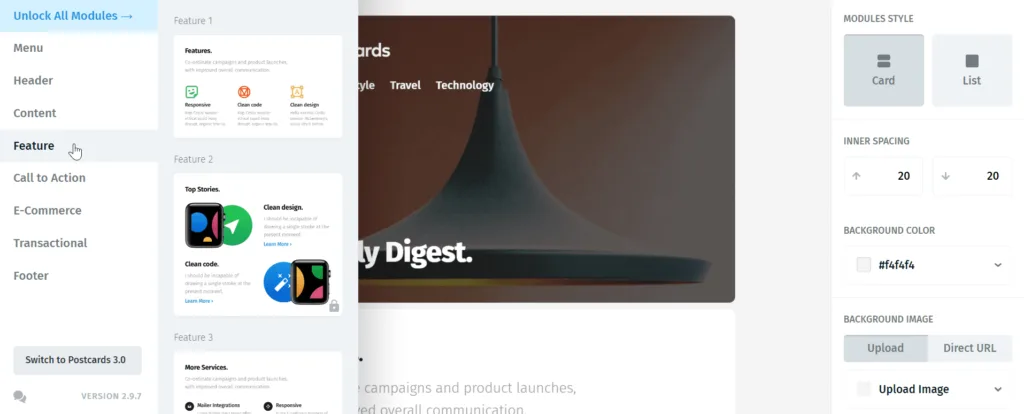
Postcards now has a library of ready-made email templates, some free and some Premium, which open straight in the editor. You can also build an email from 100+ modules with the help of the Postcards drag-n-drop editor. Some of the modules include:
- headers;
- different types of content: headers, a news article, blog posts, clients’ logos, etc.
- several kinds of lists for different purposes;
- CTA buttons;
- item cards for ecommerce;
- transactional elements;
- footers with social media logos and unsubscribe links.
Designmodo Postcards Integrations with ESPs
Designmodo Postcards exports emails in one click to 18 email platforms, and every plan includes every integration. The list includes HubSpot, Mailchimp, Klaviyo, SendGrid, Brevo, Constant Contact, Zoho Campaigns, SendPulse, Mailgun, Postmark, Sendy, GetResponse, Kit, Moosend, and Mailjet. The number of exports per month depends on the plan.
For other platforms, you can download the HTML code or a ZIP archive of a Postcards email and upload it to any platform that supports HTML. Don’t forget to test the email before sending it to your email base!
The current list of integrations is on the Postcards integrations page.
Designmodo Postcards Pricing Review
Postcards has three plans for both freelancers and businesses:
- Start. A free plan with no time limit: it lets you try the drag-n-drop editor and export up to 5 emails a month. Image hosting, AMP, and AI features are not included.
- Plus. This plan costs $19 a month (or $16 a month if you pay annually). It adds image hosting, AMP elements, the AI text assistant, HTML Email Import, and 20 exports a month.
- Pro. This plan costs $29 a month (or $24 a month if you pay annually) and gives you unlimited exports, more seats for your team, and image hosting with a CDN.
Designmodo Postcards Alternatives and Competitors
The table below compares Designmodo Postcards with some alternative email editors like Blocks, Stripo, and Stensul: you can consult it to choose a platform that aligns with your goals. Take a look at Postcards and its competitors’ features, including integrations, email templates, opportunity to edit HTML code, and more.
| Postcards | Stensul | Blocks | Stripo | |
|---|---|---|---|---|
| Price per month for freelancers/teams | From $16 billed yearly, $19 monthly | On request | From $17 billed yearly, $20 monthly | From $16.7 billed yearly, $20 monthly |
| Pricing for agencies | Pro: $24 billed yearly, $29 monthly | On request | $80 billed yearly, $95 monthly | $104 billed yearly, $125 monthly |
| Free period | Free plan forever | ✕ (demo only) | Free plan forever | Free plan forever |
| Code-free drag-n-drop editor | ✓ | ✓ | ✓ | ✓ |
| HTML emails | ✓ | ✓ | ✓ | ✓ |
| Built-in HTML code editor | Code snippets with inline CSS | ✕ | ✓ | ✓ |
| Built-in export to ESPs | 18 platforms, including Mailchimp, HubSpot, and Klaviyo | Marketo, Eloqua, Salesforce, and more | Mailchimp, Klaviyo, HubSpot, and 8 more | 90+ platforms, including HubSpot, Mailchimp, and Klaviyo |
| Import of HTML emails and migration from other editors | AI import on paid plans | ✕ | Import of HTML, EML, and ZIP; free migration by our team | Import of HTML, MJML, and ZIP |
| Free email templates | ✓ | Downloadable templates on its website | ✓ | ✓ |
| Dynamic email content | Countdown timers only | ✓ | ✓ (dynamic code on Advanced and Pro plans) | ✓ |
| Image hosting | ✓ (paid plans) | ✓ | ✓ | ✓ |
| GIFs support | ✓ | Not stated | ✓ | ✓ |
| AMP support | ✓ (paid plans) | ✕ | AMP elements: carousel, accordion, form | ✓ |
| Mobile adaptivity | Hide on any device and mobile-specific settings | Partial | Hide on any device; mobile settings for elements on paid plans | Hide any element and set mobile styles |
| Plugin for SaaS | ✕ | ✕ | ✓ | ✓ |
| Text AI assistant | ✓ (paid plans) | ✓ | ✓ | ✓ |
| Image AI generator | ✕ | ✓ | ✓ | ✓ (monthly limit) |
| Email AI generator | ✓ (paid plans) | ✓ | ✓ | ✓ |
Prices and features are as of October 2026 and taken from the vendors’ official pages.
If you are looking for more information about Stensul and Stripo, you can read the articles we made about these services.
Also, if you find any mistakes or inconsistencies in this article or any other article in our blog, feel free to contact us at support@useblocks.io. We will react and fix everything ASAP.