
Unlayer Review: Editor Features, Templates, and Pricing
Unlayer is a drag-and-drop editor for HTML emails and landing pages. Its design app for freelancers and teams, Unlayer Studio, was retired on June 30, 2026, and today Unlayer sells Unlayer Embed, an editor that developers build into their own apps. Read on for our review of the Unlayer email editor, templates, and pricing, and a comparison of Unlayer and alternatives: Unlayer vs Beefree, Unlayer vs Blocks, and Unlayer vs Stripo.
What is Unlayer? Overall Review
Unlayer is a drag-n-drop design platform that lets you create HTML emails and landing pages. Unlayer creates responsive custom email templates that can be exported to practically any ESP that supports HTML. Some of the platforms where you can export your Unlayer templates include:
- HubSpot;
- Mailchimp;
- SendGrid;
- Brevo (formerly Sendinblue);
- Klaviyo;
- Moosend, and some others.
Unlayer Features
Let’s discuss some unique features of Unlayer that make it stand out from competitors.
- Collaboration tools. You can add new users, set their roles, and create rules for certain groups of collaborators.
- Custom elements of email. You can create custom blocks and save them to use in your next email designs.
- HTML tool. Add custom HTML code to make your email templates even more unique and enhance your subscribers’ experience.
- Dynamic content. You can personalize your campaigns by adding dynamic content like name, order, etc.
Unlayer Editor
There are two ways to use the Unlayer drag-n-drop email editor.
- Unlayer Studio. It was a drag-n-drop tool for freelancers and agencies for email building and team collaboration, with all the features mentioned above. Studio was retired on June 30, 2026: according to Unlayer’s announcement, Studio accounts are no longer accessible, and images hosted through Studio have stopped loading. If you used Studio, see how to move your emails to Blocks.
- Unlayer Embed. It’s a drag-n-drop plugin for SaaS that can be embedded in your application. Unlayer Embed is fully white-labeled and can be used by your employees as well as your clients.
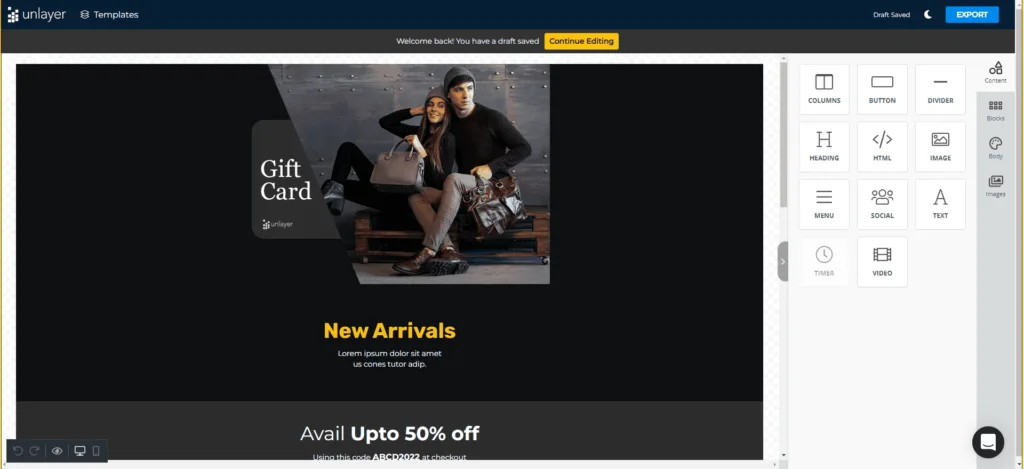
Unlayer Studio interface
Unlayer Templates
Email templates library by Unlayer includes around 1000 ready-to-use HTML templates. Some of them can be used for free, so you can try them out in the Unlayer drag-n-drop editor right away.
Unlayer’s email templates collection includes:
- templates for different industries: education, beauty, ecommerce, etc.;
- email templates for various events and holidays like Christmas, 4th of July, Black Friday, and other popular events;
- templates for triggered campaigns: for example, abandoned cart, welcome, and confirmation emails.
Unlayer Pricing
Unlayer Studio plans are no longer sold: Studio subscriptions ended when Studio was retired on June 30, 2026.
Today Unlayer sells Unlayer Embed, the editor for developers and SaaS. As of October 2026, the Embed plans are:
- Free: the email, page, popup, and document builders, no credit card required.
- Launch ($250 per month): 5,000 exports and 1 TB of bandwidth per month.
- Scale ($750 per month): 25,000 exports per month.
- Optimize ($2,000 per month): 100,000 exports per month.
- Enterprise: custom contracts.
Unlayer Alternatives: Unlayer vs Beefree vs Blocks vs Stripo
Let’s compare Unlayer with alternative tools to find out which platform suits you the most: Unlayer vs Beefree vs Blocks vs Stripo. Pay attention to different features, pricing plans, and other details stated in our table.
| Unlayer | Beefree | Blocks | Stripo | |
|---|---|---|---|---|
| Price per month for freelancers/teams | — | Starting from $25 | Starting from $16 | Starting from $12.5 |
| Pricing for agencies | — | All plans | $79 | $95 |
| Free period | Lifetime | Lifetime | Lifetime | Lifetime |
| Code-free drag-n-drop editor | ✓ | ✓ | ✓ | ✓ |
| HTML emails | ✓ | ✓ | ✓ | ✓ |
| Built-in HTML code editor | ✕ | ✕ | ✓ | ✓ |
| Built-in export to ESPs | HubSpot, Salesforce, Eloqua, and more | Mailchimp, HubSpot, Brevo, and more | Mailchimp, Klaviyo, HubSpot, and more | Mailchimp, Klaviyo, Brevo, and 18 more |
| Seamless migration from other HTML email editors | ✕ | ✕ | ✓ | ✓ |
| Free email templates | ✓ | ✓ | ✓ | ✓ |
| Dynamic email content | ✓ | ✓ | ✓ | ✓ |
| Image hosting | ✓ | ✓ | ✓ | ✓ |
| GIFs support | ✓ | ✓ | ✓ | ✓ |
| AMP support | ✕ | For Plugin paid plans only | ✓ | ✓ |
| Mobile adaptivity | Partial | For all the elements of an email | For all the elements of an email | Partial |
| Plugin for SaaS | ✓ | ✓ | ✓ | ✓ |
| Text AI assistant | ✓ | ✓ | ✓ | ✓ |
| Image AI generator | ✓ | ✕ | ✓ | ✕ |
| Email AI generator | ✕ | ✕ | ✓ | ✕ |
Unlayer no longer has plans for freelancers, teams, and agencies: Unlayer Studio was retired on June 30, 2026. Unlayer Embed for developers starts from $250 per month after the free plan.
Our team produced articles dedicated both to Beefree and Stripo for your convenience. You can find more info about these tools and their comparisons with other services there.
In case you are looking for an alternative to Unlayer templates, try our responsive email templates: they work with any ESP that supports HTML!
Also, if you find any mistakes or inconsistencies in this article or any other article in our blog, feel free to contact us at support@useblocks.io. We will react and fix everything ASAP.